The site is slow, the origin is at 100% CPU, and someone in the incident channel says "turn on Under Attack mode". It is one switch in the Cloudflare dashboard, and it often does stop the flood. It also stops your mobile app, your payment provider's callbacks and your uptime monitoring, and nobody notices until the next morning.
This post covers what Under Attack mode actually does, when it is the right call, how to limit the damage, and how to stop a DDoS attack with more targeted tools.
What Under Attack mode does
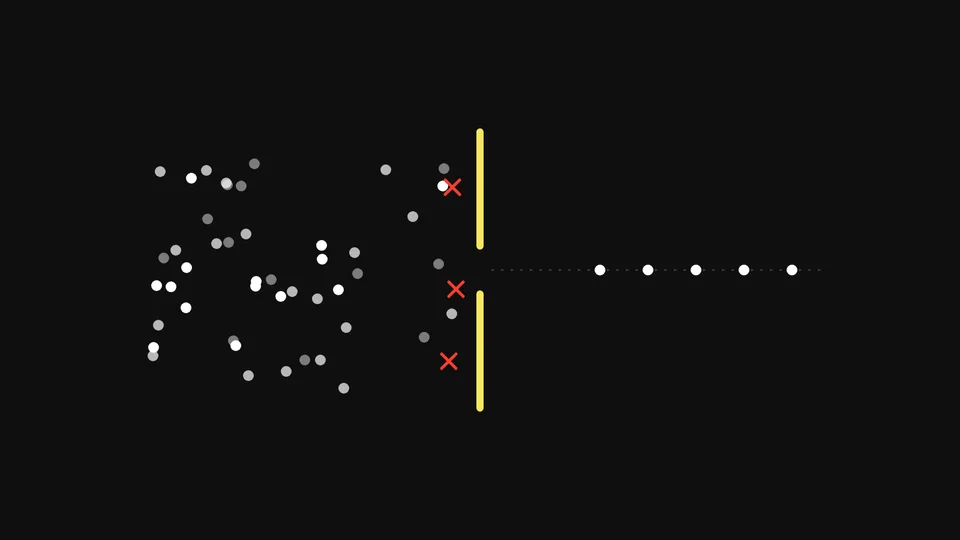
I'm Under Attack mode adds extra checks to help mitigate layer 7 (HTTP) DDoS attacks1. With it on, visitors see an interstitial challenge page before your site loads. Today that page is a Cloudflare Managed Challenge, and the browser needs JavaScript to pass it.
A visitor who passes gets a cf_clearance cookie and is not challenged again until it expires. The default lifetime is 30 minutes, set under challenge passage in the security settings2.
What it does not do:
- It does not touch network-layer attacks. Cloudflare mitigates layer 3 and 4 DDoS attacks automatically on every plan3. If your problem is a volumetric flood against an IP address, this switch is irrelevant.
- It does not protect an exposed origin. If attackers already know your origin's IP address, they can bypass Cloudflare entirely.
- It is not selective. Every request from every visitor on the affected hostnames is challenged, including your best customers.
The scale of both kinds of attack is large. In the first half of 2026 alone, Cloudflare reported mitigating4:
- HTTP DDoS requests
- 29.64 trillion
- The layer Under Attack mode helps with
- Network-layer DDoS attacks
- 23.2 million
- Mitigated automatically, with no switch to flip
- Network-layer attacks over 1 Tbps
- 935
- Cloudflare, H1 2026
Cloudflare's own documentation describes it as one of the last resorts when a zone is under attack, and warns that it pauses access to your site, affects analytics and may affect API traffic15.
What it breaks
Anything that is not a person in a browser cannot solve a challenge. Before you turn it on, list what talks to the zone:
| Client | What happens | What to do |
|---|---|---|
| Mobile app calling an API | Gets a challenge page instead of JSON; the app shows an error | Exempt the API hostname or path |
| Payment provider webhooks | Callbacks fail; orders stay "pending" | Exempt the callback path, then check orders after the incident |
| Partner and B2B integrations | Requests fail silently on their side | Exempt by path, and tell the partner |
| Uptime monitoring | Reports the site as down, or as up because it sees a 403 page | Expect false alerts; check monitors after |
| Embedded widgets, iframes and single-page app fetches | Partial pages, broken forms | Test the key journeys with the mode on |
| Search engine crawlers | Cloudflare's 2012 launch post said it was designed not to block them; current documentation doesn't restate this | Don't leave the mode on for days |
The mode also changes what your analytics see, so traffic charts from the incident window are not comparable with normal days.
When to turn it on
Under Attack mode is the right call when all of these are true:
- The attack is HTTP traffic hitting your site through Cloudflare, not traffic to your origin's IP address.
- The origin is failing or close to it, so you need relief in minutes.
- You can't yet see a pattern (a path, country, ASN or user agent) to write a targeted rule against.
- The site is mainly used in browsers, or you can exempt the API and integration paths.
If you can already see the pattern, a targeted rule is better. If the site is mostly an API, Under Attack mode will hurt you more than the attacker.
How to turn it on, and how to scope it
For the whole zone
In the Cloudflare dashboard, open the zone overview and use the Under Attack mode toggle in Quick Actions1. It takes effect within seconds.
Through the API, Under Attack mode is the under_attack value of the zone's security_level setting:
curl -X PATCH "https://api.cloudflare.com/client/v4/zones/$ZONE_ID/settings/security_level" \
  -H "Authorization: Bearer $CLOUDFLARE_API_TOKEN" \
  -H "Content-Type: application/json" \
  --data '{"value":"under_attack"}'
Keep the command, and the one that sets it back, in your incident runbook, so turning it off is as easy as turning it on.
For one path, or with exceptions
You don't have to challenge the whole site. A configuration rule can turn Under Attack mode on for matching requests only, such as /login or /search, where the flood is landing1. The same kind of rule can turn it off for paths that must keep working, such as /api/ or your payment callback route.
Scoping to the attacked path is usually the best compromise. Customers browsing the rest of the site see nothing, and the attacker's traffic to the expensive endpoint gets challenged.
How to stop a DDoS attack on Cloudflare, in order
Under Attack mode is one step in a sequence. When an HTTP flood starts, work through this list:
Confirm the traffic comes through Cloudflare. If the origin's IP address is exposed, attackers can bypass the edge. Allow only Cloudflare's IP ranges at the origin firewall, and move the origin if its address is widely known.
Look at Security Events and analytics. Find what the attack has in common: path, method, country, ASN, user agent, query string. Even a rough pattern is enough for a first rule.
Write a targeted rule. A WAF custom rule with a managed challenge or block on that pattern, or a rate limiting rule on the attacked path. Our post on Cloudflare rate limiting rules covers thresholds.
Check the HTTP DDoS managed ruleset. It is always on. You can change its sensitivity and action with an override, and Cloudflare recommends keeping the default high sensitivity6.
Cache what you can. Requests served from cache never reach the origin. A flood against a cacheable page often ends with one cache rule.
Use Under Attack mode if the origin is still failing, scoped as tightly as you can, while you keep looking for the pattern.
Plan the exit. Once a targeted rule holds, turn Under Attack mode off, watch for ten minutes, and record what you changed and why.
Our Learn article on how to stop a DDoS attack covers the wider picture, including attacks that aren't on Cloudflare yet. For what Cloudflare's latest attack data means for your configuration, see what Cloudflare's H1 2026 DDoS report means for your edge.
After the incident
Under Attack mode left on is a common finding weeks after an incident. Close the loop:
- Turn it off and confirm the security level is back to its usual value.
- Check the integrations in the table above. Look for orders stuck in "pending", failed partner calls and app error reports during the incident window.
- Keep the targeted rules that worked, with a review date, and remove the ones that didn't.
- Write down the pattern and the rule that stopped it, so the next on-call engineer starts at step 3, not step 1.
Under attack and not on Cloudflare yet
If the site is not behind Cloudflare, none of the above applies until it is. Vigilbase runs emergency Cloudflare onboarding to move exposed web traffic onto Cloudflare and stabilise it. For a single domain that should have been protected before the attack, Vigilbase Shield puts it behind Cloudflare with managed WAF rules and DDoS protection on a monthly plan. How we operate Cloudflare DDoS protection day to day, including who leads an incident, is set by the Managed Cloudflare package and the SLA.
What does Cloudflare Under Attack mode do?
It shows a Managed Challenge page to every visitor before your site loads. Browsers that pass get a cookie that lasts 30 minutes by default. It only helps against HTTP floods; Cloudflare handles network-layer attacks automatically.
Should I leave Under Attack mode on all the time?
No. Cloudflare describes it as a last resort that pauses access to your site and affects analytics and API traffic. Use it during an attack, scope it as narrowly as you can, and replace it with targeted rules.
Does Under Attack mode affect my API?
Yes. API clients, mobile apps and webhooks cannot pass a challenge. Use a configuration rule to turn the mode off for API paths, or turn it on only for the browser paths under attack.
Does Under Attack mode hurt SEO?
Cloudflare designed it not to block search engine crawlers, but its current documentation doesn't restate that. A few hours during an attack is unlikely to matter; leaving it on for weeks is a risk you don't need.
Sources
- ↩
Cloudflare, Under Attack mode: what it does, Quick Actions and configuration rules.
- ↩
Cloudflare, Challenge passage:
cf_clearancelifetime. - ↩
Cloudflare, DDoS protection: automatic network-layer and HTTP DDoS mitigation on every plan.
- ↩
Cloudflare, DDoS threat report for H1 2026.
- ↩
Cloudflare, Security Level: when to use Under Attack mode and the current Security Level behaviour.
- ↩
Cloudflare, HTTP DDoS attack protection: sensitivity, actions and overrides.